| Ask The Trades | |
|
https://www.askthetrades.co.uk/cgi-bin/yabb/YaBB.pl
DIY Forum >> Alarms, Phones, Aerials, CCTV & Datacomms >> PC Power consumption https://www.askthetrades.co.uk/cgi-bin/yabb/YaBB.pl?num=1215782287 Message started by CWatters on Jul 11th, 2008, 2:18pm |
|
|
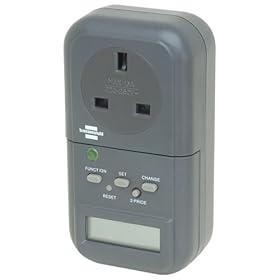
Title: PC Power consumption Post by CWatters on Jul 11th, 2008, 2:18pm I've just purchased one of these plug in power monitors. So far I've only done some quick checks on my PC but they were quite interesting... First everything working.. PC +LCD Monitor + External hard drive + printer all "ON" = 180W Next I thought I'd take a look at how much it burns when I switch everything "off" using the readily accessible front panel switches. These are the ones I use all the time. So I shut down windows and hit the button on the printer and LCD etc The system still burns 50W. Yikes, I've been on two week holidays in the past with it switched "off" like that. So I went investigating I discovered that some devices are a lot better than others. For example my big Epson A3 printer burns almost nothing when switched off using the front panel button. Full marks Epson. On the other hand the Samsung LCD monitor burns 14W. This is with the power button off remember, I didn't just let windows put it into standby. Since it only burn 25W fully illuminated the front panel button should be remaned the "half power button". Edit: This monitor has an Energy Star label on it! My PC burns 36W with Windows shutdown and all the fans stopped, which I thought a rather high. Wonder why it's so much? All its doing is monitoring the front panel button. None of the motherboard or anything is powered up. Now the surprise... Many PC have a switch on the back of the power supply. I'd assumed that turning this off was equivalent to unpluging the machine from the wall....but it seems not. Even with this switch turned off my PC still burns 17W. |
|
Title: Re: PC Power consumption Post by RabbitRabbit on Jul 14th, 2008, 8:40pm CWatters wrote on Jul 11th, 2008, 2:18pm:
So in let's say 10 Million homes (conservative guess) that is 170MW of power down the toilet. How many 'wind farms' does it take to power 10M home PC's that have been 'switched off'. Frightening aint it. Is the only answer to pull the 100A cut-out? clearly we cannot rely on the suppliers (except Apple Corp of course ;)) |
|
Title: Re: PC Power consumption Post by Zambezi on Nov 6th, 2008, 11:02am CWaters which energy monitor thingy did you buy? There are loads out there, some cheap some stoopidly expensive. |
|
Title: Re: PC Power consumption Post by big_all on Nov 6th, 2008, 1:06pm i bought a flow metrer several years ago i measured all tvs videos and freeveiw boxes the average on standby was 17% one video didnt register on standby one tv was 37 percent my printer uses 50% on off because it has a transformer so gets unplugged basicly anything with a transformer will use quite a lot unless unplugged dont forget the little neon light on sockets use up several watts so 3 or 4 can add up |
|
Title: Re: PC Power consumption Post by Zambezi on Nov 6th, 2008, 2:03pm Another thing to watch is the remote controlled sockets, like Byron, Goodbye Standby etc use a bit of power when the appliance is off. It is not much though. My old phone charger used 70W of power, which never used to get unplugged! |
|
Title: Re: PC Power consumption Post by CWatters on Nov 6th, 2008, 3:44pm I went for a Brennenstuhl PM 230 plug adaptor style monitor. http://www.amazon.co.uk/Power-Energy-Monitor-by-Brennenstuhl/dp/B000XSX1PA Not that well designed. The lead you plug in obscures the display. One reviewer says it tends to over estimate the power used by low power devices (eg 11W lamp reads 15W) and recommends this one instead but this one doesn't have a battery backup so if unplugged or power cut the data is lost. http://www.amazon.co.uk/gp/product/B000Q7PJGW/ref=cm_cr_asin_lnk |
|
Title: Re: PC Power consumption Post by honeythedog on Nov 14th, 2008, 12:13pm CWatters wrote on Jul 11th, 2008, 2:18pm:
I'm by no means an expert - but I think that in that state the motherboard etc are still powered up and ready to go (as well as the PSU). I know mine still has a few LEDs alight when switched "off" by the front panel. |
|
Ask The Trades » Powered by YaBB 2.3! YaBB © 2000-2008. All Rights Reserved. |